
ChitramTV is an internet-based TV service that functions just like your traditional cable or satellite service. You can use a remote control to navigate and watch it, much like you would with your current setup. The only requirement is a broadband internet connection with a speed of at least 1.5 Mbit/s.
There are two straightforward methods to access ChitramTV.
1. Connect ChitramTV Box to Your TV
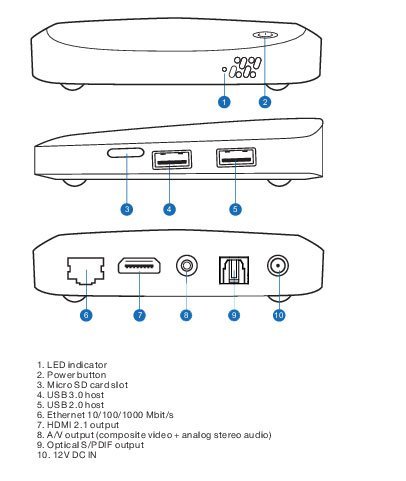
Step A: Connecting Video and Audio to TV
- Take the HDMI cable (7) and plug one end into the HDMI port on your device.
- Connect the other end of the HDMI cable to the corresponding HDMI port on your TV.
Step B: Connecting Power
- Use the Power adapter (10) to connect one end to the Power port on your device.
- Plug the other end of the Power adapter into a power outlet.
Caution: Only provide power after completing all other connections.
Step C: Connecting to the Internet Router
- Take an Ethernet cable and connect one end to the Ethernet port on your device.
- Connect the other end of the Ethernet cable to an available port on your Internet router.
2. To access ChitramTV on your Computer, Mobile, or Tablet, follow these simple steps:
1. Visit the ChitramTV Download Page at – https://chitramtv.ie/downloads
2. Choose and download your preferred app.
3. Log in to the app using your credentials.
4. Start watching and enjoy the content.